Creation of a SaaS prototype stock analytics app with AI as FE for FPGA using Streamlit, QuestDB and AI to analyse news in a few hours

The need of an flexible app to evaluate algorithms with high performance

The base app was made in a few hours, after that has it been extended and improved, It’s built with Python, using Streamlit for UI, selected QuestDB for high performance database, uses stock data from Alpaca, Polygon and NewsAPI, able to run locally on a Mac (Apple Silicon) and as scalable server on Linux, (can also be deployed to Cloud) which is intended to be using (a prototype already exists, more of that later) multithreading to concurrently read stock data from a long list and pass it on to the FPGA that will process the data in around 300ns timeframe to locate stocks with the right strategy match and issue an order if risk management passes.

Cursor was used to generate code and test procedures, the generated code didn’t always work until a few rounds had been made to correct errors, one problem is that Cursor breaks the code quite often when a code change is introduced.

Deepseek-R1 is used to analyse stock news information based on the provided symbol collected from NewsAPI. The main use of the app is to work out a strategy that is intended be tailored for the unique platform and infrastructure in terms of performance/timings and

The AI part (Deepseek-r1:1.5b on MacBook Pro (M1/M2) on Linux server is 7b model currently being tested) is used excessively to analyse news information and report generation, it’s quite fast on the Mac (M1/M2), depending on the select stock symbol of course AAPL (Apple) for example will take much longer (currently 30s (M1)) due to the amount of data to analyse compared to a very small almost unknown company, a preprocessing step may be good idea to implement here, therefore it’s designed to be run in the background and the GPU performance will highly depend on the elapsed time

News Analysis by AI

News API (short)

Analysis

Risk Management

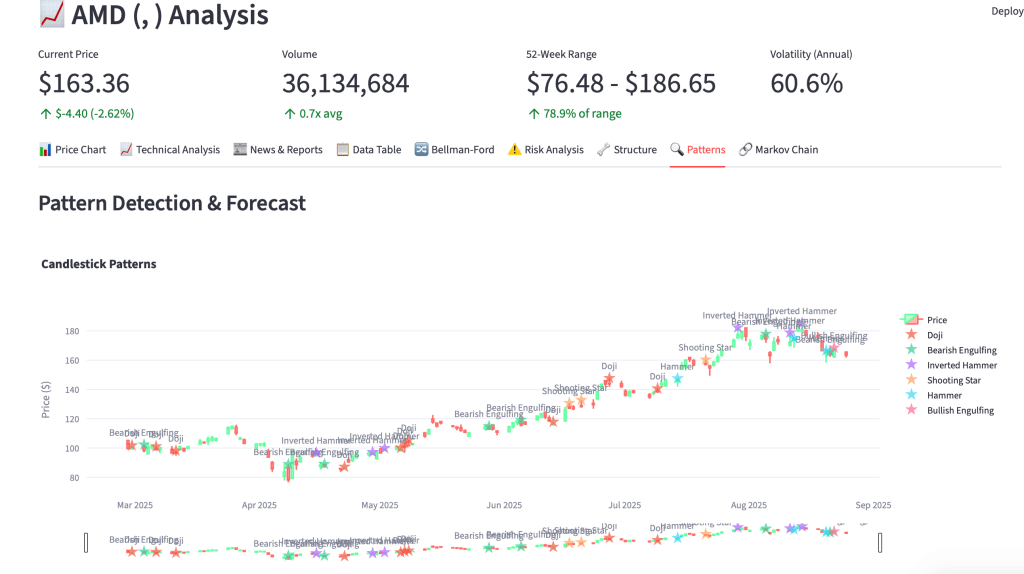
Patterns
Future ahead

(no AI was used to write this text)

Coming up: Real-time data against FPGA to stress analytics and latency/timings
Creation of a SaaS prototype stock analytics app with AI as FE for FPGA using Streamlit, QuestDB and AI to analyse news in a few hours

The need of an flexible app to evaluate algorithms with high performance

The base app was made in a few hours, after that has it been extended and improved, It’s built with Python, using Streamlit for UI, selected QuestDB for high performance database, uses stock data from Alpaca, Polygon and NewsAPI, able to run locally on a Mac (Apple Silicon) and as scalable server on Linux, (can also be deployed to Cloud) which is intended to be using (a prototype already exists, more of that later) multithreading to concurrently read stock data from a long list and pass it on to the FPGA that will process the data in around 300ns timeframe to locate stocks with the right strategy match and issue an order if risk management passes.

Cursor was used to generate code and test procedures, the generated code didn’t always work until a few rounds had been made to correct errors, one problem is that Cursor breaks the code quite often when a code change is introduced.

Deepseek-R1 is used to analyse stock news information based on the provided symbol collected from NewsAPI. The main use of the app is to work out a strategy that is intended be tailored for the unique platform and infrastructure in terms of performance/timings and

The AI part (Deepseek-r1:1.5b on MacBook Pro (M1/M2) on Linux server is 7b model currently being tested) is used excessively to analyse news information and report generation, it’s quite fast on the Mac (M1/M2), depending on the select stock symbol of course AAPL (Apple) for example will take much longer (currently 30s (M1)) due to the amount of data to analyse compared to a very small almost unknown company, a preprocessing step may be good idea to implement here, therefore it’s designed to be run in the background and the GPU performance will highly depend on the elapsed time

News Analysis by AI

News API (short)

Analysis

Risk Management

Patterns

Future ahead

(no AI was used to write this text)

Coming up: Real-time data against FPGA to stress analytics and latency/timings

K6 with QuestDB

It’s easier than one think

I’ve run into problems when loading performance data into Grafana with “another database” used to collect statistics for huge amounts of k6 performance test data with high cardinality, after a while, normally a few months, will the update of the Grafana dashboard become slow and take longer as time pass. I’m forced to create a new bucket to write to, start from scratch more or less, if needed

I happened to run into QuestDB while working on a “personal sized HFT solution” , I needed a extremely fast database, easy to manage and potentially already have some available resources for this particular purpose, so while searching I found discussions regarding the best DB for this low latency industry, most suggested QuestDB, so I gave it a try

I decided to use a Ubuntu VM on a overclocked Ivy Bridge and fast SSD to reduce the physical limited HW resources, downloaded and extracted the file structure, with a simple command started the database for it’s main directory:

bin/questdb.sh start

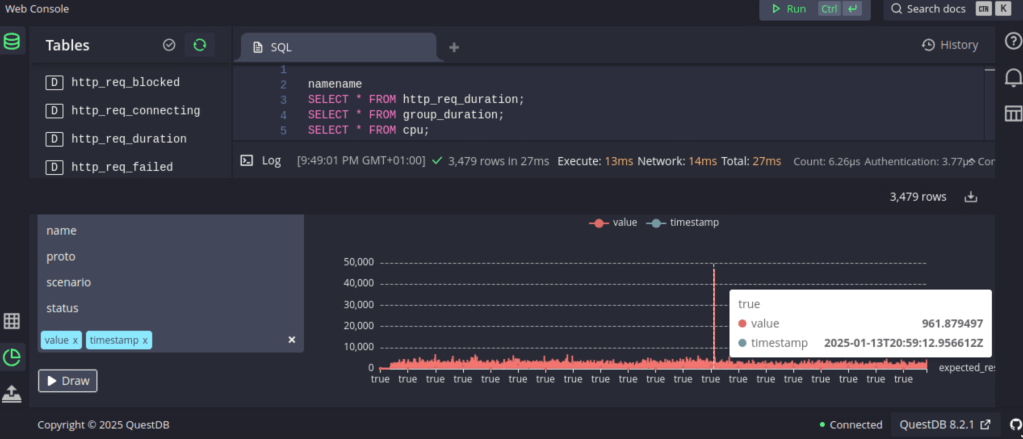
Jumped to localhost:9000 to access the WebConsole, imported a few samples and tried some queries, loaded a benchmark, ran it a couple of time and examined the results.

Then I noticed that QuestDB has a influxDB interface, so I thought, what about k6?

I tried a few command line variations, got it working quite quick:

k6 run script.js –out influxdb=http://localhost:9000

Found the data in the tables section (up to the left), a tried a number of combinations using the “draw” function to view the k6 results directly in the WebConsole, then I thought “Grafana”, there’s an excellent link how to setup Grafana for QuestDB: https://questdb.com/docs/third-party-tools/grafana/

There’s also information on how to query the database and you’ll get started faster on a fast DB than you may have expected

Next step will be to take a backup of the old database and import into QuestDB to evaluate the old data access.